- Home/
- Gortex/
- What's new in Gortex — May–June 2026/
- Plain-English guide: what changed, and how to use it/
Plain-English guide: what changed, and how to use it
Table of Contents
If you use Gortex — through an AI coding agent or from the command line — the last two months made your librarian noticeably sharper. You don’t need to read the source, the internals, or any graph theory to benefit. This guide is the on-ramp: plain words, simple analogies, and the exact command or setting for each improvement. The deep dives are linked at the end of every section if you want the full story.
The mental model #
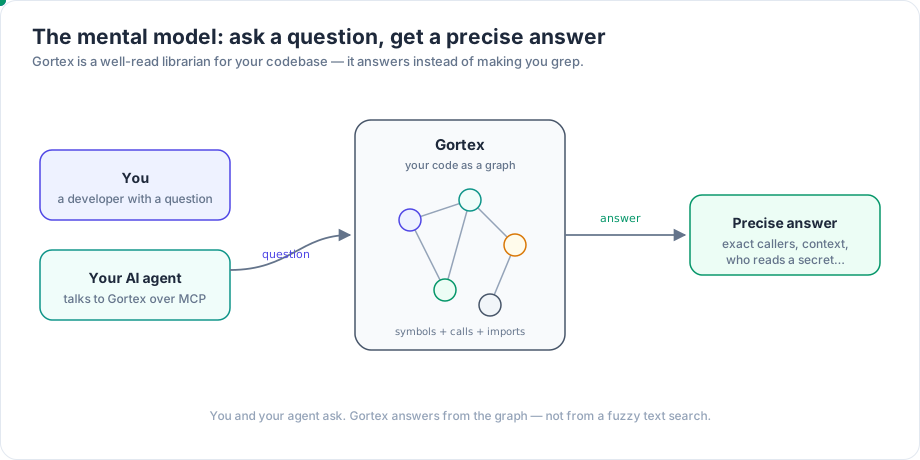
Gortex reads your repositories and turns them into a knowledge graph — a map where every function, type, and file is a dot (a “node”), and every relationship between them (this calls that, this imports that, this implements that) is a line (an “edge”). Then it hands that map to you and your AI agent over two doors: an MCP server (the protocol your agent speaks) and a CLI.
Think of it as a very well-read librarian for your codebase. Instead of grepping and guessing, your agent asks precise questions — “who calls this?”, “what reads this secret?”, “give me just enough context for this task” — and Gortex answers from the map.
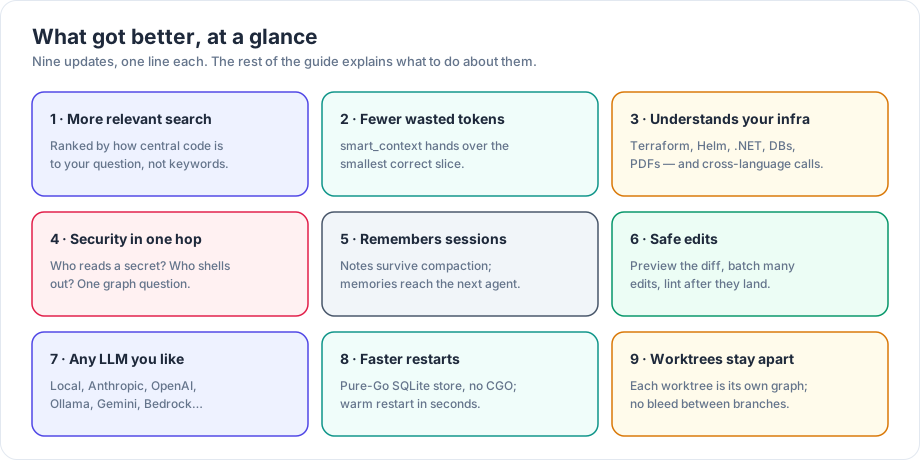
Everything below is one of nine ways that librarian got better.
1. Search answers got more relevant #
What changed. Ranking used to be hand-tuned. Now results are ordered by how central a piece of code is to the part of the graph your question is about — not just how many keywords match. The blend of “exact word match” versus “meaning” auto-tunes per query, vague questions get expanded by meaning, and a query that would return nothing gets rescued by being broken into parts. The team can also now measure ranking quality instead of guessing.
What to do. Mostly nothing — search_symbols and the ask agent are simply better now. For natural-language questions the default assist:auto expands them; assist:on forces expansion and reranking; assist:off is pure keyword search. If you run a team, you can measure your own retrieval quality:
gortex eval pack
2. Your agent wastes fewer tokens #
What changed. smart_context hands your agent the smallest correct set of code for a task. It now pulls in exactly what a change depends on, scales the budget to the size of your repo, and can render code at different densities. The big lever is compress_bodies: it replaces function bodies with their signature plus doc-comment — roughly 30–40% of the original tokens, across 14 languages. And delta_from re-sends only what changed since the last pack.
What to do. Open every task with smart_context. When you only need the shape of code, not the bodies, ask for compression:
read_file(path, compress_bodies: true)
get_symbol_source(symbol, compress_bodies: true)
get_editing_context(path, compress_bodies: true)
On follow-up calls, pass delta_from to avoid re-sending what your agent already has.
3. It understands more of your stack #
What changed. Gortex now indexes far more than application code: Terraform, Helm, Ansible, .NET, COBOL/JCL, Quarto, Luau, C/C++ macros, MCP configs — plus images and PDFs as graph nodes, and even a live database schema. On top of that, a “synthesizer engine” recovers call edges that frameworks create at runtime and that cross language boundaries: React Native JS-to-native, Swift/Objective-C, Spring and Symfony dependency injection, MyBatis SQL, WebSocket/SSE. The upshot: find_usages and get_callers catch more real callers and report fewer false “this is unused” results.
What to do. Index your infra and docs too, not just app code. Declare specs and ADRs as artifacts: in .gortex.yaml so your agent can find them. Pull a live database schema into the graph:
gortex db schema --postgres <dsn>
For a language Gortex has no grammar for, add a regex fallback-chunker or an external extractor-plugin in .gortex.yaml — no fork required. (For cross-language call recovery specifically, see
the resolution deep dive; for the new file types,
the languages deep dive.)
4. It can answer security and performance questions #
What changed. “Capability edges” turn three audit questions into one-hop graph lookups: what reads this environment secret, what shells out to run a process, and what writes this field. That’s the backbone of a least-privilege or supply-chain check. A new bottleneck analyzer finds hidden slow paths where loops nest across function calls — a cubic hot path that no single function reveals on its own. And analyze is now a 60-kind dispatcher that also includes a 190-rule security scan, health grades, and change-impact scoring.
What to do. Hunt hot paths and audit capabilities directly:
analyze(kind: "bottlenecks")
analyze(kind: "sast")
walk_graph(... reads_env / executes_process / accesses_field ...)
Traverse the capability edges (reads_env, executes_process, accesses_field) via walk_graph, nav, or graph_query to answer “what reads $AWS_SECRET” without reading a single file.
5. It remembers things across sessions #
What changed. Two memory layers, for two different timescales. Session notes (save_note, query_notes, distill_session) survive a context compaction within one session — your agent’s scratchpad doesn’t get wiped when the conversation gets summarized. Development memories (store_memory, query_memories, surface_memories) are cross-session and team-wide. They’re anchored to a symbol and surfaced automatically when that symbol comes back into the working set — so a hard-won “do not change this without X” lesson reaches the next agent, not just you.
What to do. Use store_memory for durable invariants, gotchas, and decisions. Call surface_memories at the start of a task to pick up what past agents learned. Use save_note as a per-session scratchpad for “remember this for the next half hour.”
6. It edits code safely #
What changed. Edits made over MCP can now be previewed before they land — dry_run plus a unified-diff preview show you exactly what will change. Multiple heterogeneous edits compose in a single batch_edit. And after an edit, a syntax-health check plus an external-linter bridge (lint_file) catch a bad change immediately instead of three steps later. There’s also a coordination registry so several agents can work together without stepping on each other.
What to do. Preview before you apply, and trust the post-edit check:
edit_file(path, ..., dry_run: true)   # see the diff first
lint_file(path)                       # catch problems right away
7. Run it on any LLM you already pay for #
What changed. The ask agent and assisted search run on a provider you choose. Supported today: local llama.cpp, Anthropic, OpenAI, Ollama, Gemini, AWS Bedrock, DeepSeek — plus two CLI-subprocess providers that reuse your existing sign-in, the claude CLI and the codex CLI. Optional graph-aware routing sends simple tasks to a cheaper model and complex ones to a stronger model (off by default). If a provider can’t start — missing API key, say — the ask tool just stays off and the direct graph tools keep working.
What to do. Set your provider and its key/model in .gortex.yaml (or via GORTEX_LLM_PROVIDER). The HTTP and subprocess providers need no special build:
llm:
  provider: anthropic   # or openai, ollama, gemini, bedrock, deepseek, claudecli, codex, local
  routing:              # optional, off by default
    enabled: true
    simple_model: <cheaper-model>
    complex_model: <stronger-model>
8. Faster, simpler install and restart #
What changed. The graph store is now a pure-Go SQLite backend by default — no CGO needed for the store itself (the tree-sitter parsers still use CGO at build time), and it ships FTS5 full-text search. Restarts are warm: the daemon reconciles only what changed since last time (using saved file modification times) and comes back in seconds. All your per-user state now lives under one ~/.gortex home, auto-migrated on first run. On the VS Code repo, search p95 dropped about 77%, smart_context p95 about 55%, and get_file_summary p95 about 94%.
What to do. Nothing required — SQLite is the default. If you want to choose explicitly:
gortex --backend memory # or: --backend sqlite (default)
9. Multiple worktrees stay separate #
What changed. Each git worktree is now its own repository instance, with its own graph. So callers, usages, and resolution don’t bleed between your main checkout and a feature-branch worktree — a question about main answers from main, and a question about your feature worktree answers from that tree.
What to do. Track each worktree you care about. Gortex keeps them isolated across the CLI, the daemon, and MCP — no special flag needed.
A debugging afternoon, before and after #
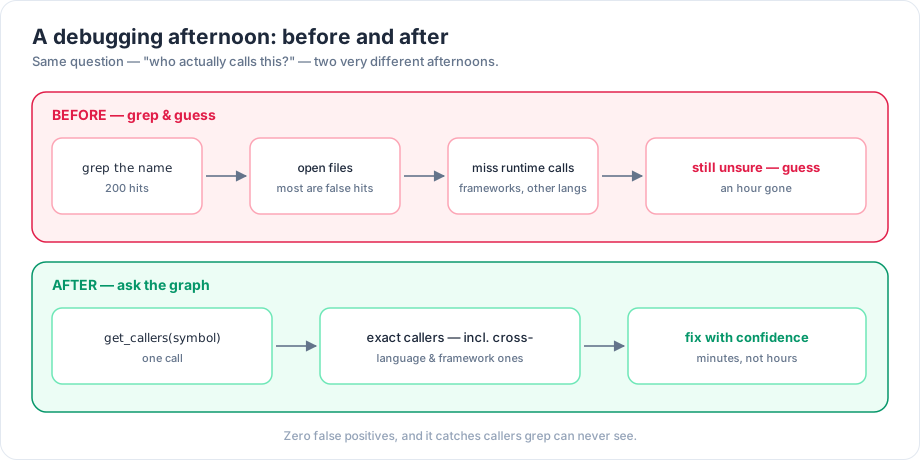
The clearest way to feel the difference is the oldest question in the book — “who actually calls this?”
Try this today #
A short map from a plain question to the exact tool or command:
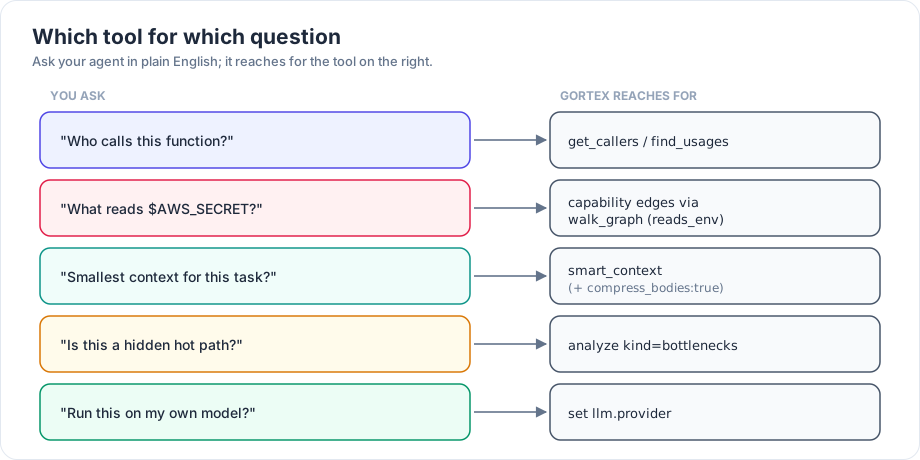
- “Who calls this?” →
get_callers/find_usages - “What reads
$AWS_SECRET?” → capability edges (reads_env) viawalk_graph - “Smallest context for this task?” →
smart_context(addcompress_bodies: true) - “Is this a hidden hot path?” →
analyze kind=bottlenecks - “Run this on my own model?” → set
llm.provider - “What did past agents learn here?” →
surface_memories - “Show me the diff before it lands?” →
edit_filewithdry_run: true
Where to go deeper: each section above links to its full deep dive — start with Retrieval got a lot smarter and follow the series from there.
Part of the Gortex May–June 2026 release series.